Question posted 2013 · +2 upvotes
Is there a way we can trigger a macro function on column filter in excel??
Please help
Thanks.
Accepted answer +9 upvotes
I was just thinking if I can post this answer. I guess some of you will not like it as it is not direct answer by presentation of bypass solution. However I think I can show that idea as we don’t have all project assumptions in the question.
Let’s agree- we all know that there is no event which fires after we change filtering. However, I see one option.
Changing filter could fire Worksheet_Calculate event (not Worksheet_Change). If there is any single formula within your sheet than we will fire that event each time we change filtering criteria using our mouse.
Step 1. put any single formula in the sheet, like in cell ZZ1 where =ZZ2
Step 2. I assume that our data range starts in Range(A1) and we have titles in first row (see the picture). I assume also there is nothing below that area.
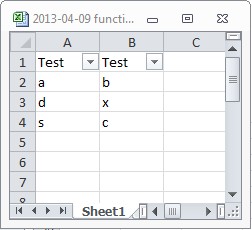
Step 3. Put that following solution in Sheet1 module.
Private Sub Worksheet_Calculate()

If ActiveSheet.Name = "Sheet1" Then
    If Cells(Rows.Count, 1).End(xlUp).Row = 1 Then
        MsgBox "No data available"
    Else
        MsgBox "There are filtering results"
    End If
End If
End Sub
Step 4. Using filter would fire that event and result with following situations:
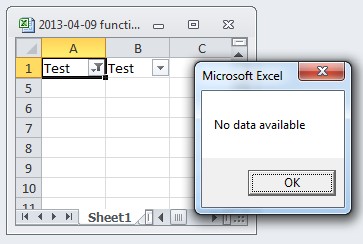
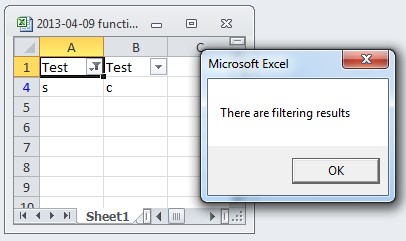
I hope someone will like it and can use that. Even if it’s only a bypass idea.
Excel VBA objects referenced (5)
ActiveSheet.Name— Refer to Named RangesActiveSheet.Name— Invalid procedure name errorRange— Refer to Cells by Using a Range ObjectRange— Delete Duplicate Entries in a RangeRows.Count— Count function (Microsoft Access SQL)
Top excel-vba Q&A (6)
- How to clear the entire array? +58 (2010)
- How to change Format of a Cell to Text using VBA +55 (2011)
- Download attachment from Outlook and Open in Excel +43 (2012)
- Can a VBA function in Excel return a range? +36 (2009)
- 2 Dimensional array from range +34 (2013)
- Hiding an Excel worksheet with VBA +33 (2009)
excel-vba solutions on this site
.