Question posted 2016 · +7 upvotes
It is pretty much widely accepted that this is not ‘best practise’.
dim rng as range
with thisworkbook    '<~~ possibly set an external workbook
    with .worksheets("sheet1")
        set rng = .range(cells(2, 1), cells(rows.count, 1).end(xlup))
    end with
end with
The two Range.Cells properties that define the scope of the Range object will default to the ActiveSheet property. If this is not Sheet1 (defined as the .Parent in the With … End With statement), the assignment will fail with,
Run-tim error '1004': Application-defined or object-defined error
Solution: use .Cells not Cells. Case closed.
But…
Is the . necessary in this Range object definition when both the Range.Cells properties inherit the .Parent worksheet property that is defined in the With … End With statement?
How can this,
dim rng as range
with thisworkbook    '<~~ possibly set an external workbook
    with .worksheets("sheet1")
        ' define rng as Sheet1!A2 to the last populated cell in Sheet1!A:A
        set rng = .range(.cells(2, 1), .cells(rows.count, 1).end(xlup))  '<~~ .range
    end with
end with
debug.print rng.address(0, 0, external:=true)
… be different from this,
dim rng as range
with thisworkbook    '<~~ possibly set an external workbook
    with .worksheets("sheet1")
        ' define rng as Sheet1!A2 to the last populated cell in Sheet1!A:A
        set rng = range(.cells(2, 1), .cells(rows.count, 1).end(xlup))  '<~~ range not .range
    end with
end with
debug.print rng.address(0, 0, external:=true)
We use .range when the parameters that define the scope of the range are ambiguous; e.g. .range([A1]) The A1 cell could be from any worksheet and will default to the ActiveSheet property without the .. But why do we need to reference the parent of a range object when the scope that defines it has properly referenced its parent worksheet?
Accepted answer +11 upvotes
My opinion is slightly different here.
YES it is required. You can’t always control where the user may run the code from.
Please consider these few test cases
SCENARIO
Workbook has 2 worksheets. Sheet1 and Sheet2
TEST 1 (Running from a module)
Both Code give same result
TEST 2 (Running from a Sheet code area of Sheet1)
Both Code give same result
TEST 3 (Running from a Sheet code area of Sheet2)
'~~> This code fails
set rng = range(.cells(2, 1), .cells(rows.count, 1).end(xlup))
You will get Application Defined or Object defined error
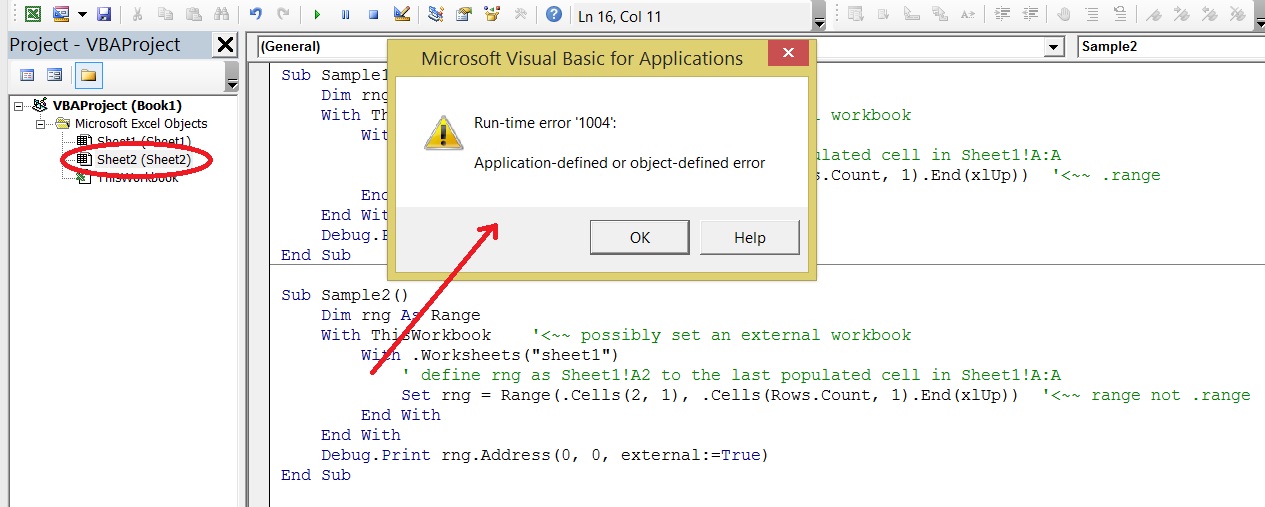
And hence it is always advisable to properly qualify your objects so that the code can run from anywhere
Excel VBA objects referenced (5)
Application— Using events with the Application objectApplication— Working with Other ApplicationsRange— Refer to Cells by Using a Range ObjectRange— Delete Duplicate Entries in a RangeRange.Cells— Looping Through a Range of Cells
Top excel-vba Q&A (6)
- How to clear the entire array? +58 (2010)
- How to change Format of a Cell to Text using VBA +55 (2011)
- Download attachment from Outlook and Open in Excel +43 (2012)
- Can a VBA function in Excel return a range? +36 (2009)
- 2 Dimensional array from range +34 (2013)
- Hiding an Excel worksheet with VBA +33 (2009)
excel-vba solutions on this site
.