Question posted 2011 · +4 upvotes
I have a requirement to create an XLS file on the basis of a CSV file using Java.
Please suppest to me which API is best to create excel file.
Thanks
Accepted answer +16 upvotes
I suggest you use the Apache POI framework (specifically the HSSF / XSSF API) for writing out the XLS file.
For reading a CSV file I suggest you use OpenCSV as it will take care of escaped characters etc for you.
Putting together the POI example from here and the OpenCSV example from here gives you this:
import java.io.*;
import org.apache.poi.hssf.usermodel.HSSFWorkbook;
import org.apache.poi.ss.usermodel.*;
import au.com.bytecode.opencsv.CSVReader;

class Test {
    public static void main(String[] args) throws IOException {
        Workbook wb = new HSSFWorkbook();
        CreationHelper helper = wb.getCreationHelper();
        Sheet sheet = wb.createSheet("new sheet");

        CSVReader reader = new CSVReader(new FileReader("data.csv"));
        String[] line;
        int r = 0;
        while ((line = reader.readNext()) != null) {
            Row row = sheet.createRow((short) r++);

            for (int i = 0; i < line.length; i++)
                row.createCell(i)
                   .setCellValue(helper.createRichTextString(line[i]));
        }

        // Write the output to a file
        FileOutputStream fileOut = new FileOutputStream("workbook.xls");
        wb.write(fileOut);
        fileOut.close();
    }
}

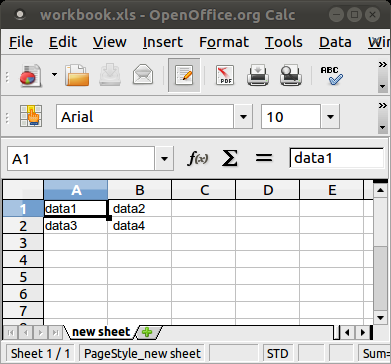
External references cited (2)
- poi.apache.org — Apache POI framework
- opencsv.sourceforge.net — OpenCSV
Top excel Q&A (6)
- Shortcut to Apply a Formula to an Entire Column in Excel +335 (2011)
- How should I escape commas and speech marks in CSV files so they work in Excel? +136 (2012)
- Convert xlsx to csv in linux command line +96 (2012)
- How to create a link inside a cell using EPPlus +50 (2011)
- IF statement: how to leave cell blank if condition is false ("" does not work) +44 (2013)
- T-SQL: Export to new Excel file +44 (2012)
excel solutions on this site
— top 22%.