Question posted 2013 · +6 upvotes
I am creating an excel sheet dynamically and inserting values in to the same.But value in some cells are getting inserted in the wrong format.
Following is my excel sheet 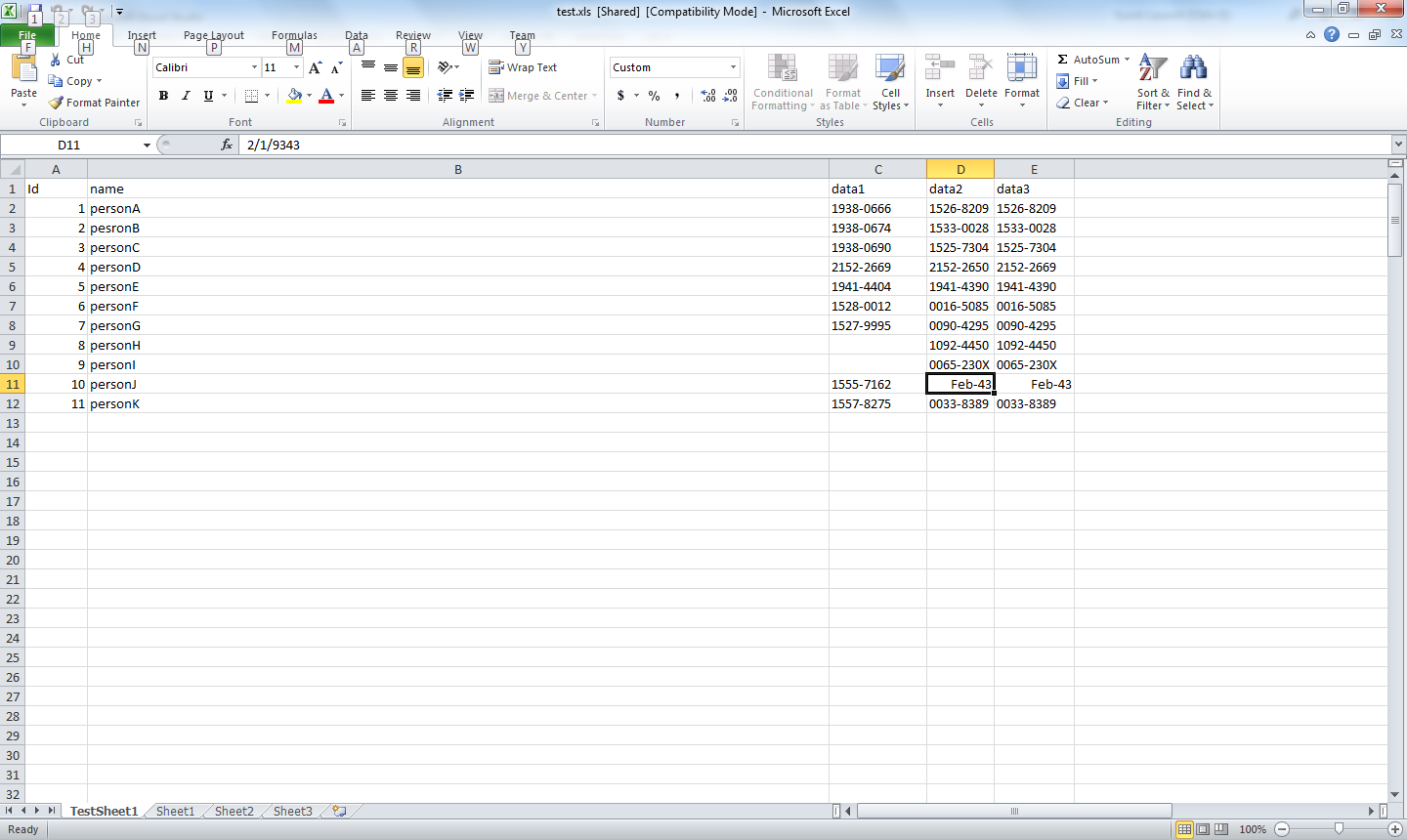 value in the selected cell should have been 0002-9343 but it is inserted as Feb-43.This due to some wrong format for that column(column-D) in the excel sheet.
I need to change the whole column-D (all cells comming under heading D “data2”) to ‘Text Format’ before entering the data.
Following is the code for creating the excel sheet and inserting data
value in the selected cell should have been 0002-9343 but it is inserted as Feb-43.This due to some wrong format for that column(column-D) in the excel sheet.
I need to change the whole column-D (all cells comming under heading D “data2”) to ‘Text Format’ before entering the data.
Following is the code for creating the excel sheet and inserting data
excel = new Application();
            excel.Visible = false;
            wb = (_Workbook)(excel.Workbooks.Add(System.Reflection.Missing.Value));
            sheet = wb.Sheets.Add();
            sheet.Name = "TestSheet1";
            sheet.Cells[1, "A"].Value2 = "Id";
            sheet.Cells[1, "B"].Value2 = "Name";
            sheet.Cells[1, "C"].Value2 = "Data1";
            sheet.Cells[1, "D"].Value2 = "Data2";
            sheet.Cells[1, "E"].Value2 = "Data3";

            for (int i = 0; i < 10; i++)
            {
                    id = i;
                    result = object;
                    data = JsonConvert.DeserializeObject(result);

        name  = (data != null) ? data.name : string.Empty;
                    data1 = (data != null) ? data.data1 : string.Empty;
                    data2 = (data != null) ? data.data2 : string.Empty;
                    data3 = (data != null) ? data.data3 : string.Empty;

                    sheet.Cells[i + 2, "A"].Value2 = name;
                    sheet.Cells[i + 2, "B"].Value2 = data1;
                    sheet.Cells[i + 2, "C"].Value2 = data2;
                    sheet.Cells[i + 2, "D"].Value2 = data3;
            }
            string ExcelPath = Some_path;
            wb.SaveAsExcelPath,XlFileFormat.xlWorkbookNormal, null, null, false, false, XlSaveAsAccessMode.xlShared, false, false, null, null, null);
            wb.Close(true);
            excel.Quit();
Now ,before the loop I need to change the format of cells under Column-D to Text Format. How to do the same from code in c#?
Accepted answer +5 upvotes
Now ,before the loop I need to change the format of cells under Column-D to Text Format. How to do the same from code in c#?
To change the format of the entire column use this
// 4 is for Col D
sheet.Cells[1, 4].EntireColumn.NumberFormat = "@";
Remember to format Col D before you attempt writing to it. Using .EntireColumn will ensure that you will not have to change the format of the Excel Cells individually 🙂
Excel VBA objects referenced (4)
Application— Using events with the Application objectApplication— Working with Other ApplicationsMissing.Value— Cell Error ValuesMissing.Value— Fill a Value Down into Blank Cells in a Column
Top excel Q&A (6)
- Shortcut to Apply a Formula to an Entire Column in Excel +335 (2011)
- How should I escape commas and speech marks in CSV files so they work in Excel? +136 (2012)
- Convert xlsx to csv in linux command line +96 (2012)
- How to create a link inside a cell using EPPlus +50 (2011)
- IF statement: how to leave cell blank if condition is false ("" does not work) +44 (2013)
- T-SQL: Export to new Excel file +44 (2012)
excel solutions on this site
.