Question posted 2015 · +6 upvotes
I have imported a csv file from MySQL, documenting part numbers and descriptions. Some of these part numbers have values like 1234567890987654321, which is then shortened by excel to 1.23e18. Problem is, I cannot query a part with this formatted data.
Now I cannot feasibly go through every cell as there are just over 28000 of them. I have converted the row to text however this does not change the data in the cell.
The closest thing I have to a solution is deleting the cells and then undo-ing, which gets the number in a textual format but then gives me a ‘number in text field’ error.
Also some parts have part numbers like 12E345 which is then changed to 1200000000000000000000000000000000000000000000- you get the picture.
Very annoying…
I would like a batch process to change all the values to text format, thanks in advance.
Accepted answer +8 upvotes
Instead of just opening the CSV in Excel, import it with Data -> External Sources -> From Text.
You will have to first pick basic things like “delimited” format, whether first row contains headers, separator etc.
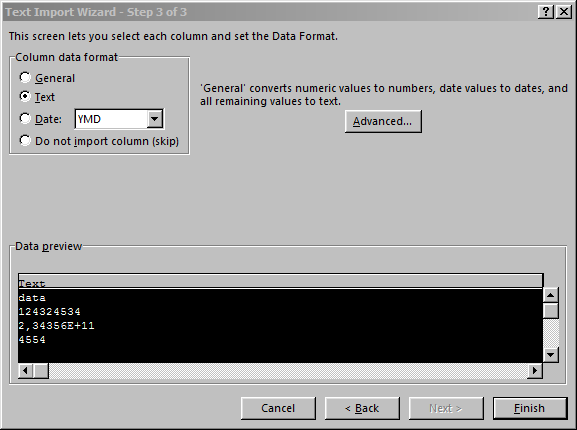
In the third part of the “Text Import wizard”, you can pick data type of each column – picking Text for your columns will probably solve the problem.
Top excel Q&A (6)
- Shortcut to Apply a Formula to an Entire Column in Excel +335 (2011)
- How should I escape commas and speech marks in CSV files so they work in Excel? +136 (2012)
- Convert xlsx to csv in linux command line +96 (2012)
- How to create a link inside a cell using EPPlus +50 (2011)
- IF statement: how to leave cell blank if condition is false ("" does not work) +44 (2013)
- T-SQL: Export to new Excel file +44 (2012)
excel solutions on this site
.