Question posted 2008 · +9 upvotes
I have an Excel Spreadsheet like this
id | data for id
   | more data for id
id | data for id
id | data for id
   | more data for id
   | even more data for id
id | data for id
   | more data for id
id | data for id
id | data for id
   | more data for id
Now I want to group the data of one id by alternating the background color of the rows
var color = white
for each row
    if the first cell is not empty and color is white
        set color to green
    if the first cell is not empty and color is green
        set color to white
    set background of row to color
Can anyone help me with a macro or some VBA code
Thanks
Accepted answer +29 upvotes
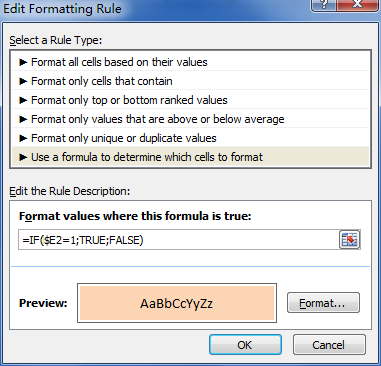
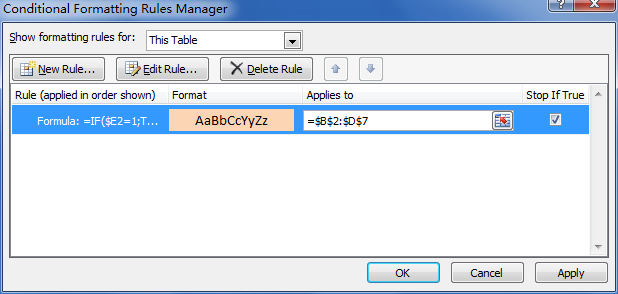
I use this formula to get the input for a conditional formatting:
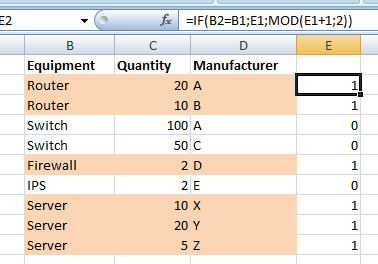
=IF(B2=B1,E1,MOD(E1+1,2)) [content of cell E2]
Where column B contains the item that needs to be grouped and E is an auxiliary column. Every time that the upper cell (B1 on this case) is the same as the current one (B2), the upper row content from column E is returned. Otherwise, it will return that content plus 1 MOD 2 (that is, the outupt will be 0 or 1, depending on the value of the upper cell).
Top excel-vba Q&A (6)
- How to clear the entire array? +58 (2010)
- How to change Format of a Cell to Text using VBA +55 (2011)
- Download attachment from Outlook and Open in Excel +43 (2012)
- Can a VBA function in Excel return a range? +36 (2009)
- 2 Dimensional array from range +34 (2013)
- Hiding an Excel worksheet with VBA +33 (2009)
excel-vba solutions on this site
— top 8%.